BCG · 2025 · Enterprise · AI
Enabling constructive career dialogue by making feedback easier to capture.
At BCG, partners wrote feedback on consultants weeks after a project ended, from memory. I designed a tool where they jot quick notes during the project, and AI turns those notes into a first draft of the review for them to edit and approve. Piloted with 50 reviewers, at a firm of 12,000+ consultants.
to complete a feedback form, in testing
of 50 pilot reviewers started from the AI-written draft
for Legal to approve the AI feature
My role
Sole product designer
Team
1 PM, 2 engineers
Timeline
13 weeks · 2025
Built for
Managers, partners and career advisors who write reviews
TL;DR
Problem
Workday held the official records, but the feedback around them lived in emails and spreadsheets. Advisors spent around two days a cycle pulling it together before it could inform a career conversation.
What I did
Private notes taken during the project, AI that drafts the review from them for the reviewer to approve, and BCG’s rubric beside the form, all on top of Workday.
Trade-off
AI drafts risk inaccuracy, so the source notes stay beside every draft, and nothing AI-made ships without the consultant’s consent.
Result
Forms took 3 minutes instead of 7 in testing, and 62% of pilot reviewers started from the AI-written draft. Tagging notes, at 67% correct, is the step still to fix.
01 — The problem
The problem wasn’t a lack of feedback. It was everything it took to make feedback useful.
Workday held the official review record. BCG’s career-development process ran well beyond the form.
Feedback lived across email, spreadsheets and Workday. Career Development Advisors gathered and reconciled it by hand before it could inform a development conversation or a promotion committee.
Across 12,000+ consultants, that admin added up.
for one advisor to compile feedback for a single review cycle. I found this in conversations with 20 Career Development Advisors.
Before: information scattered across the process

Feedback arriving

Spreadsheets
Manual collation

Workday
Formal records
By hand
Manual consolidation by CDAs
Gathering, reconciling and preparing information
Career Development Committee
Reviewing evidence and discussing progression
Design opportunity
Connect the workflow, not just the forms.
The opportunity wasn’t to rebuild Workday or replace its existing capabilities. It was to create a more connected experience around BCG’s specific career development workflow.
Workday
The underlying HR system. It stays the official record of every review.
CD+
BCG’s own feedback-gathering and career-development workflow, built around Workday.
The gap it closes
The admin between receiving feedback and making it actionable.
We needed to move from collecting feedback to making it useful.
Who’s involved, and what wasn’t working
Who
What they do
What wasn’t working
Partners and managing directors
Write feedback after every project, and read it to make promotion decisions
Writing happened weeks later, from memory. Reading was slow, unstructured and often unclear
Career advisors (HR)
Collect feedback from several reviewers into one file per consultant
Fragmented and slow to pull together, with no view of who had submitted, so deadlines were hard to enforce
Leadership committees
Decide promotions and development plans
Decisions made in Excel, from inputs of uneven quality
Consultants
Receive feedback and use it to grow
Saw it at mid-year review, too late to remember the project
What we couldn’t change
BCG’s grading rubric
Every review is graded against it
Workday
Stays the official record. We build on it, not around it
Partner time
Is billable. Every minute of admin is a minute not billed
Consent
No AI feature could ship without consultants’ consent (GDPR)
Before any screens: mapping how reviews really work
Before designing anything, I sketched the review process on paper: who is involved, what a career advisor has to pull together, and how a review moves from the goals set at the start of a project to the final file.


02 — Research
Research showed where the effort sat: between receiving feedback and using it.
Method
Who
What it gave us
20 interviews, 15 min each
Career advisors
The four themes below
Workflow audit
The product team
Three parallel ways of capturing feedback
Unmoderated usability test
Reviewers
Task success and time on task
Observing promotion meetings
Turned down
So we relied on interviews and testing instead
Four themes, and what each asked of the design
01 · Fragmented
“It takes me about two days just to compile feedback for one review cycle.”
So the design must: one place to capture, draft and submit.
02 · Late
“I only see my feedback during mid-year reviews. By then, I can’t remember the project context.”
So the design must: capture during the project, not at review time.
03 · Retyped
“By the time I finish typing everything up, I have no energy left to actually talk to the consultant.”
So the design must: remove the retyping.
04 · Wanting AI
“If an AI could pre-populate my summary, I’d just review and tweak.”
So the design must: let ai draft, and the reviewer decide.
Three bets we would check at launch
Bet 1
Capture in the moment
Private notes taken during the project keep the details, and make feedback more frequent.
Bet 2
AI drafts, people decide
AI drafts from those notes speed up writing, without taking ownership away from the reviewer.
Bet 3
One place, one rubric
One place for feedback, with BCG’s rubric built in, gives more consistent reviews than piecing them together from separate tools.
Where the time really went
When we mapped the full review journey, most of the time wasn’t spent writing feedback. It went into compiling it: career advisors retyping notes from many partners into one file per consultant. The map later anchored a leadership workshop across four BCG business units.

03 — First concept
We tested the first concept inside BCG before committing to it.
Before anything was final, we put the first concept in front of partners and career advisors inside BCG. What they said became the brief: the project comes first, show everyone in one place, feel like the tools they already use, and make the form something people want to fill in.


Where I changed the direction
01 · Reframed the problem
We couldn’t change the review cycle or BCG’s rubric. Timing and authorship were the levers we did have, so that’s where the design went.
02 · Cut my own onboarding flow
It fitted the goal-setting agreement neatly, but added work at the start and didn’t touch the real bottleneck.

04 — Key decisions
Three decisions, and what each one cost.
Decision 1
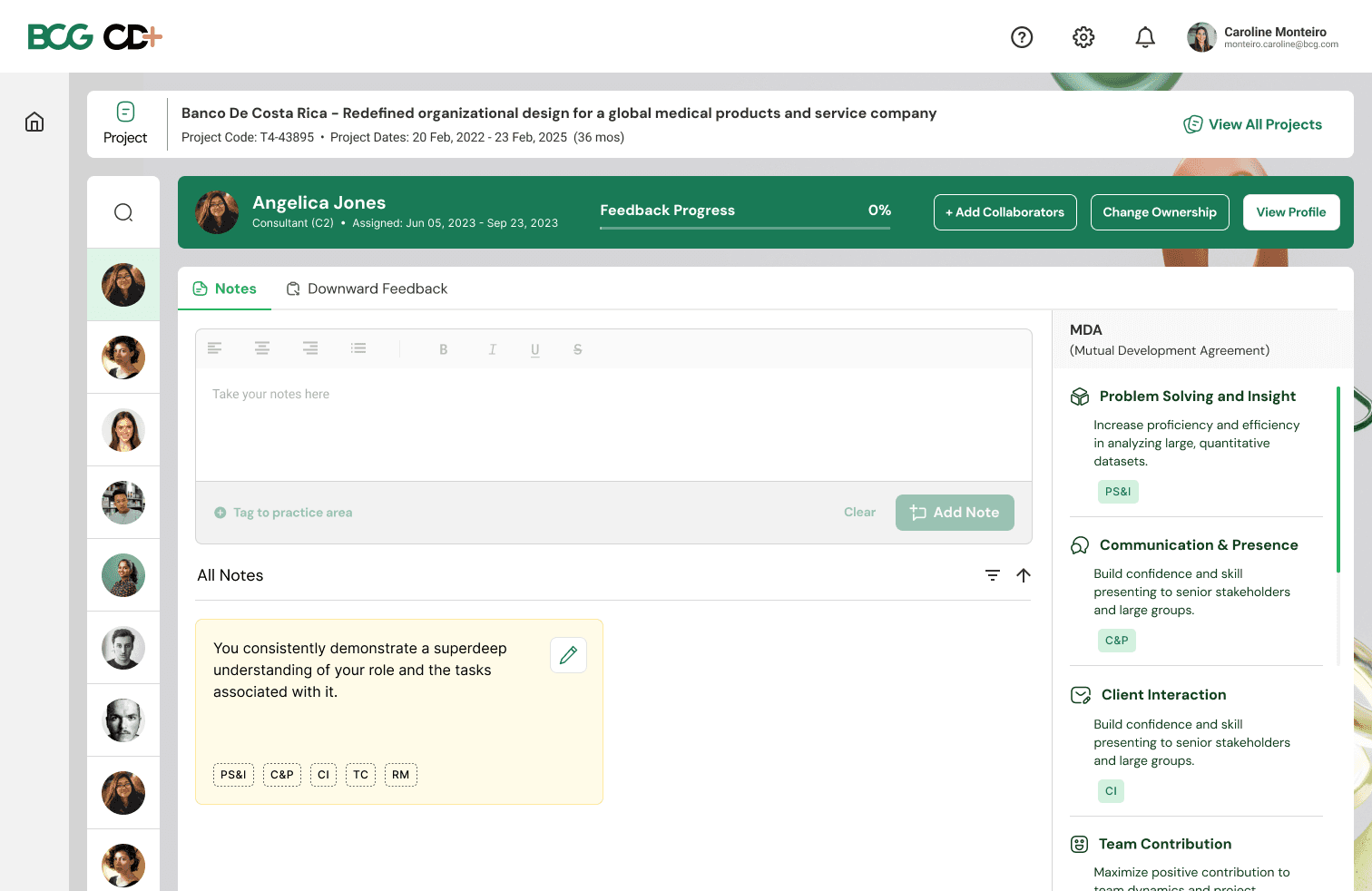
Private notes during the project, separate from the formal review
Reviewers forgot the details by review time. Notes taken in the moment, that nobody else sees, are honest and frequent.
Instead of
Write straight into the formal form.
Trade-off
One extra step to bring notes into the review.
Decision 2
AI writes the first draft. The reviewer edits and approves it.
Reviewers told us they would rather review and tweak than write from a blank page.
Instead of
Fully manual, or AI that submits on its own.
Trade-off
Accuracy risk, so the source notes stay visible beside every draft.

Decision 3
Build on top of Workday, not inside it
Workday is the system of record for reviews, and people already know it. CD+ handles the part that’s specific to BCG: gathering feedback during the project and turning it into a review.
Instead of
Building everything inside Workday’s own extension tools.
Trade-off
We inherited Workday’s login and data structure.

The shift
Feedback used to wait for review season. Now it’s written while the work is fresh.
Before
Project ends
Weeks pass
Feedback written from memory
Retyped into one file
Promotion meeting
Weeks
After
Notes during the project
AI writes a first draft
Reviewer edits and approves
Feedback reaches the consultant
< 24 h
05 — The final experience
Feedback capture: notes during the project, and the assessment at the end.
But feedback only matters if I can capture it on the move: in between meetings, in a taxi, on the way to the next client. Especially if I’m a partner.

On the phone
The mobile app follows the reviewer’s path: pick the project, pick the person, write the note. The assessment is there too, for when a project ends on the road.

01 · My projects
Every case the reviewer is on

02 · The team
Pick the person to give feedback to
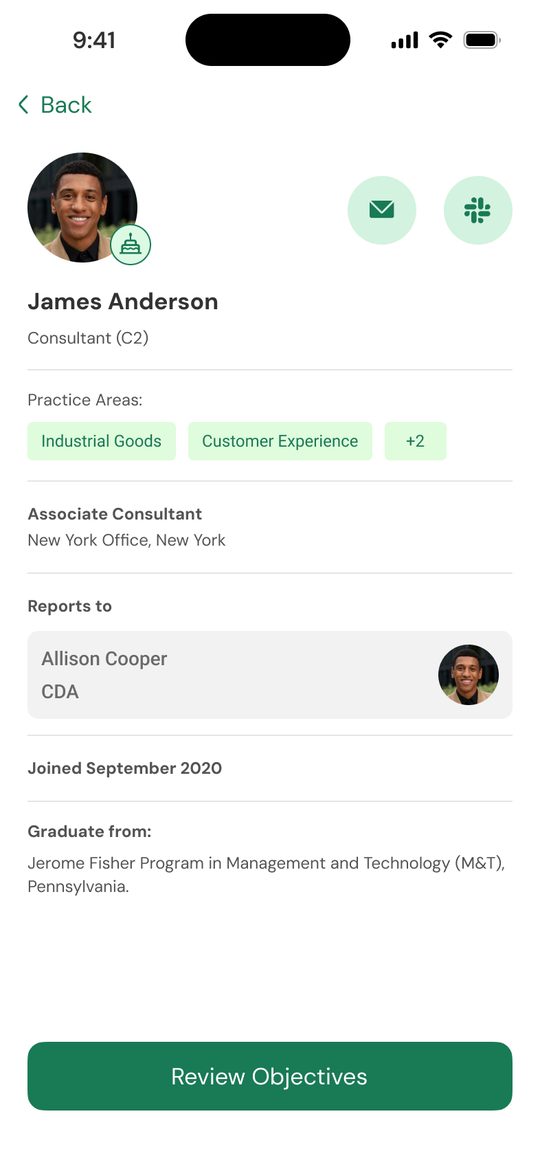
03 · The consultant
Who they are, before you write

04 · Notes
Write it while the work is fresh

05 · Downward feedback
The assessment, when the project ends
Where AI acts, and where it doesn’t
Drafts
Strengths, growth areas and the summary, from the reviewer’s own notes
Never
Submits on its own, or uses anyone’s data without their consent
Always visible
The source notes, beside every draft, so the reviewer can check it
Reviewer’s call
Every word that ships is edited and approved by the reviewer
The system underneath
Consistency
One standard framework across business units and projects
Transparency
Everyone knows what they’re being assessed on
Accessibility
Works on mobile and desktop, so notes can be taken anywhere
Bias checks
Designed, not yet shipped: AI that flags grading patterns across gender and region
Getting AI past Legal
Legal’s worry was UK privacy law. Using consultants’ feedback with AI, without their consent at each step, might not comply. So I proposed one company-wide opt-in, asked of every consultant before the next CDC cycle began: yes or no to AI-assisted feedback.
Saying no changes nothing for the consultant. It changes things for their advisors, who wouldn’t see AI note-taking when collecting that person’s feedback. For those cases I proposed audio notes instead: the advisor speaks, the mobile app transcribes it into notes, and they still save the time. I didn’t have time to build it, so it’s the next step I recommended.
I wrote four principles (clarity, consent, control, timing), designed the opt-in and what happens on each side of it, and recorded a walkthrough for Legal instead of waiting for a meeting.


Enable AI Assistance for Your Summary
BCG is introducing AI-powered features which can help your reviewer prepare more efficiently—only with your permission. With your consent, we can use AI to analyze your data (e.g., feedback, performance reviews) to generate insights, summaries, and personalized recommendations. Your data will be processed securely and privately, and only used to enhance your experience within the BCG platform. Read more about how we use AI here.
You remain in control—you can opt out or adjust your preferences at any time.
Please choose how you'd like to proceed:
This allows BCG to use AI to generate insights, summaries, and recommendations based on your feedback and performance data. Your consent is completely optional and can be withdrawn anytime in your settings.
The opt-in, rebuilt. Pick an option and submit: the matching plan lights up below.
If they opt in
- 01Nothing changes for the consultant
- 02Their advisors get AI note-taking and an AI first draft while collecting feedback
- 03A person edits and approves every draft before it’s shared
- 04Consent can be withdrawn at any time in settings
If they opt out
- 01Nothing changes for the consultant, and nothing about them is sent to AI
- 02Their advisors don’t see AI note-taking while collecting their feedback
- 03Proposed next step: audio notes on mobile, transcribed into notes, so advisors still save time
- 04They can opt in later from their homepage

06 — Outcome
Feedback got faster, and more of it got written.
Did the bets hold?
Bet
What happened
Verdict
Capture in the moment
A note takes 62 s to write and tag, but only 67% were tagged correctly
Partly
AI drafts, people decide
62% of 50 pilot reviewers started from the AI-written draft
Promising
One place, one rubric
Form completion fell from 7 to 3 minutes. Review consistency isn’t measured yet
Partly
Every number, by where it came from
Source
Measure
Result
Testing
Pulling notes together
15+ min per consultant → no separate step (1.5 min per note, tagged)
Testing
Completing the feedback form
7 min → 3 min
Testing
Writing and tagging a note
62 s, against a 90 s benchmark
Pilot, 50 reviewers
Started a review · started from the AI-written draft
80% · 62%
After launch
Review prep · tool use · time to feedback
−30% · +40% · under 24 h
Legal
Approval for the AI feature
10 days → 3 days
What worked, and what didn’t
Notes in one place
“Everything in one place feels relieving.”
Fast approvals
“Takes me 5 seconds to approve feedback.”
Better conversations
Less time recalling what happened, more on the consultant’s growth
Tagging
Only 67% tagged notes correctly. The one step still to fix
The bar to beat
“Only if it’s faster than Workday, then I will adopt it.”
No meeting access
How feedback is used was inferred, not observed
These are team results: I owned the experience, the PM owned the metric.
07 — How I worked
The process was part of the work.
The tool moved between design, product, Legal, data and four business units. I flagged gaps early instead of waiting: when the AI pilot had no clear owner for launch, I drafted a launch checklist and proposed a shared Slack canvas so the team could assign owners.
I also refreshed the journey map for the leadership workshop, and kept everyone working from BCG’s rubric as the one source of truth.


Three things that sped the work up
01 · Async updates on Loom
I recorded walkthroughs instead of booking meetings.
Short Loom recordings, walked through in Miro, kept Legal, product and the business units up to date on their own time. Nobody waited a week for a slot, and the sprint kept moving. The consent walkthrough above is one of them.
02 · A pilot survey with Advisors
I tested the proposition with Advisors before launch.
I ran an internal pilot survey with Career Development Advisors on AI note-taking and downward feedback, and used their answers to refine what we promised before it went wider.

03 · Maze recordings, walked through together
I showed the team how people moved, not just what they said.
We ran general-purpose Maze recordings to see how people navigated the note-taking journeys we’d built. I walked the client team through the sessions, so decisions came from watching real use.

08 — Taking it to the partners
After the pilot and Maze, we took it to the MDPs in Vienna.
We had piloted the tool with 50 reviewers and watched how people moved through it in Maze. The next step was the people whose billable time it was meant to save: BCG’s Managing Directors and Partners. Their time is hard to get, and they work across the world.
In May 2025, MDPs from around the globe gathered in Vienna for BCG’s Worldwide Officers Meeting. I flew down to put the working product in front of them, introduce what we had built, and get their feedback first-hand. Partners used the tool themselves while we talked, at the stand where BCG introduced CD+ to the firm.


What I came back with
Improvements
A list of changes to the working product, from partners using it themselves
Future-facing opportunities
Where partners saw the tool going next, beyond feedback capture
What it couldn’t tell us
How feedback is used inside a promotion meeting. That stayed unobserved
09 — Reflection
What I’d carry forward, and do differently.
Grades need context
That’s why the rubric and written feedback sit side by side
Simple forms get used
Completion time going from 7 minutes to 3 showed it first
AI needs trust to ship
The consent journey is what let the AI launch at all
Next time
Observe one promotion meeting
Before designing how feedback is read
Test tagging in week one
It was the last thing tested, and the one that underperformed
Measure quality, not only speed
None of these numbers show whether AI drafts lead to fairer promotions. I’d agree that measure with the PM before launch
Audio notes for opted-out consultants
Advisors speak, the mobile app transcribes. Proposed to Legal, not yet built
With more time
Experiments on when notes get taken, and bias checks for individual reviewers